Variance
4 minute read
The Variance customer growth platform makes your product, marketing, and sales data operational. It lets you to create, access, and manage intent-based signals across all stages of your customers’ journey.
RudderStack lets you add Variance as a destination to which you can seamlessly send your event data.
Connection compatibility
| Destination Information | |||
|---|---|---|---|
| |||


Get started
Once you have confirmed that the source platform is supported by Variance, perform the steps below:
- Configure the data source in RudderStack.
- From the list of destinations, select Variance.
- Then, assign a name to the destination and click Next.
- Select the data source and click Next. You will then see the following Connection Settings page:
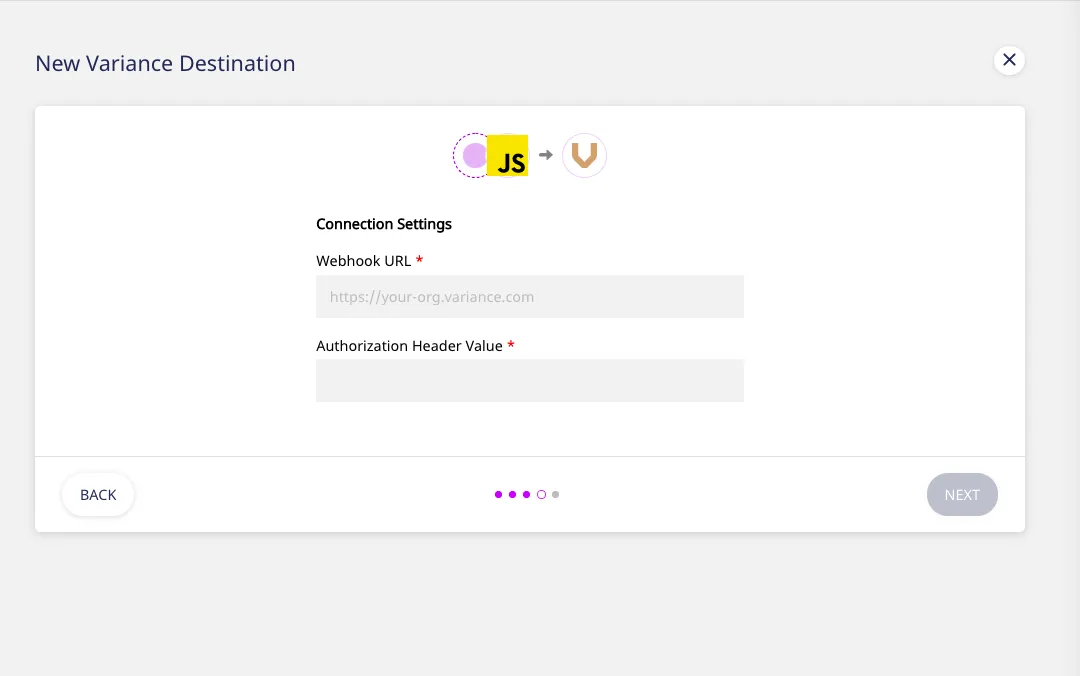
- Enter the Variance Webhook URL and Authorization Header Value to configure the destination.
- To transform your event data before sending it to this destination, click Create New Transformation. Otherwise, click Next.
That’s it! Your Variance destination is now configured and enabled.
Identify
The identify call lets you associate a visiting user to their actions as well as record their traits.
As a best practice, make sure that theidentifycall is made at the start of every session or page load for logged-in users, if possible. This will ensure allir latest traits are captured.
A sample identify call is as shown:
rudderanalytics.identify("userid", {
  name: "Name Surname",
  email: "name@website.com",
  company: {
    id: "1",
    name: "Website",
  },
})
Track
The track call allows you to record the customer events, i.e. the actions that they perform, along with their associated properties.
A sample track call is as shown:
rudderanalytics.track("Event Name", {
  plan: "plan value",
})
Page
The page call lets you record your website’s page views, with any additional relevant information about the viewed page.
A sample page call is as shown:
rudderanalytics.page("Cart", "Cart Viewed", {
  path: "/cart",
  referrer: "test.com",
  search: "term",
  title: "test_item",
  url: "http://test.in",
})
Group
The group call lets you associate a particular identified user with a group, such as a company, organization, or an account. It also lets you record the custom traits associated with that group, such as the name of the group, number of employees, etc.
A sample group call is as shown:
rudderanalytics.group("sample-group-id", {
  name: "Example Company",
  employees: 1000,
  industry: "Software",
})
Alias
Many destination platforms need an explicit alias call for mapping the already identified users to a new user identifier that you may want to use, to track them in the future. The alias call lets you implement this functionality.
A sample alias call is as shown:
rudderanalytics.alias("new_user_id");Account mapping
Variance offers a few different ways of mapping your users to accounts/companies. Here’s an overview:
Group
If you already use the group call to indicate the Account, then you do not need to fill in anything. Variance will extract the Account automatically, and you’re good to go.
Identify with custom traits
Choose this option if you include some information about the Account/Company/Organization as a trait in each identify call. When you choose this option you’ll need to let Variance know the name of the trait you use.
For instance, if you pass something like {'company':{'id':1,'name':'Awesome Inc.'}} , you could add company.id as the Account ID trait and company.name as the Account Name trait.
Identify email trait domain extraction (fallback)
If you don’t use either of the methods above, Variance can extract the domain from the email trait and use that as the Account name.
If none of these methods work for your setup, reach out to Variance support to discuss the alternatives.
FAQ
How do I get the Variance Webhook URL/Authorization Header Value?
Go to Integrations > RudderStack page in your Variance dashboard and add a RudderStack connection to get the webhook URL and authorization header value.
