Connect Reverse ETL Source to TikTok Audiences
Beta
Configure a Reverse ETL source with your TikTok Audiences destination.
5 minute read
This guide takes you through the steps to connect a Reverse ETL source to your TikTok Audiences destination.
You can connect multiple Reverse ETL sources to the TikTok Audiences destination.
Setup
Set up and configure your Reverse ETL source.
In the Overview tab of the source page, click Add destination > Create new destination. You can also select an already-configured destination here.
From the list of destinations, select TikTok Audiences and click Continue.
Specify a unique name to identify this destination in RudderStack.
In the Event delivery account section, click Select to choose from an existing TikTok account from the list. You can also click Add account and authenticate via OAuth, by specifying the following settings:
Setting
Description
Account Name
Specify a unique account name
oAuth settings
Click Connect account, sign in with TikTok, and give RudderStack the required permissions to access your TikTok Ads account.
The Advertiser ID field is automatically pre-populated based on the selected TikTok account — select the relevant ID from the dropdown.
Click Continue to configure the mapping settings.
Mapping settings
This section lists the settings to correctly map data from your Reverse ETL source to the TikTok Audiences destination.
Select audience
In this section, you can create a new audience or use an existing one.
Create new audience: Use this option to create a new custom audience in TikTok. You can specify the name and description of the new TikTok audience.
Use existing audience: Use this option if you have an existing audience in TikTok. RudderStack automatically populates this field with the relevant audiences based on your specified connection settings.
Sync mode
RudderStack supports only Mirror mode for this integration.
Map identifiers
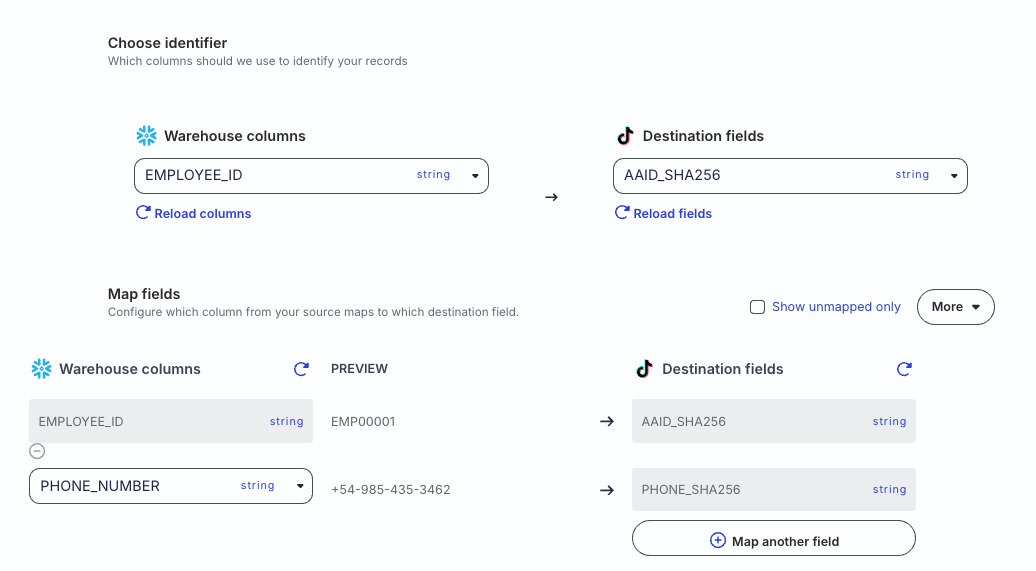
Select a warehouse column that uniquely identifies your records and map it to the relevant TikTok field.
Map the other warehouse columns to specific TikTok fields that represent your audience’s identity.
Advanced settings
Setting
Description
Automatically hash PII data
When set to Yes, RudderStack automatically hash-encodes user data in the SHA-256 format before sending it to TikTok.
Do not use this setting if you are sending already-hashed data from your warehouse to TikTok. Otherwise, it can lead to failures. See Data hashing section for more information.
Sync settings
RudderStack determines how and when to run a sync based on the sync schedule you set for your Reverse ETL connection.
Schedule type
Description
Basic
Run syncs at a given time interval and specified time (in UTC).
CRON
Run syncs based on a specified CRON expression (in UTC).
Manual
Run syncs manually.
Sync observability settings
Setting
Description
Retain sync logs
This setting is toggled on by default and instructs RudderStack to store the sync logs in your warehouse. You can also configure the below settings:
Setting
Description
Sync log retention
Specify the retention period of the sync logs in your warehouse.
If you set it to 1, then RudderStack deletes any sync log older than a day (in UTC time).
SHA256 hash of a phone number in E.164 format, for example, +1231234567
After normalization, RudderStack validates each field before sending it to TikTok.
If a field is determined to be invalid, RudderStack does not send it to TikTok.
If all fields in a row are invalid, the entire row is skipped and the event is marked as failed.
Data hashing
The Automatically hash PII data setting lets you hash your user data before sending it to TikTok. This setting is enabled by default.
Configure the setting to Yes if your incoming data is not pre-hashed
Configure this setting to No if your data is already hashed
TikTok expects the incoming data to be hashed. Hence, incorrect configuration of the Automatically hash PII data setting will result in failures:
If the Automatically hash PII data setting is configured to Yes and your data is already hashed, the event will fail.
If the Automatically hash PII data setting is configured to No and your data is not pre-hashed, the event will fail.
RudderStack rejects such events with a clear error message, for example:
Automatically hash PII data is disabled but the value for field EMAIL appears to be unhashed. Either enable hashing or send pre-hashed data.
You will also see errors in the Events tab for cases that were previously marked as successful, but were effectively resulting in no matches, helping you quickly identify and fix any data quality or configuration issues.
FAQ
Why can’t I add a Reverse ETL source from the destination page?
The Reverse ETL feature supports only source-driven pipeline configuration. It means that you must configure a Reverse ETL source in RudderStack and then connect it to a new or existing destination. Note that this destination should not be connected to any other source.
This site uses cookies to improve your experience while you navigate through the website. Out of
these
cookies, the cookies that are categorized as necessary are stored on your browser as they are as
essential
for the working of basic functionalities of the website. We also use third-party cookies that
help
us
analyze and understand how you use this website. These cookies will be stored in your browser
only
with
your
consent. You also have the option to opt-out of these cookies. But opting out of some of these
cookies
may
have an effect on your browsing experience.
Necessary
Always Enabled
Necessary cookies are absolutely essential for the website to function properly. This
category only includes cookies that ensures basic functionalities and security
features of the website. These cookies do not store any personal information.
This site uses cookies to improve your experience. If you want to
learn more about cookies and why we use them, visit our cookie
policy. We'll assume you're ok with this, but you can opt-out if you wish Cookie Settings.