Singular Cloud Mode Integration
11 minute read
RudderStack supports server-to-server (S2S) API integration with Singular. See the Singular API endpoint reference for more information.
RudderStack uses Singular’s API v2 when the event contains the Singular Device ID (SDID). Otherwise, it uses API v1 with platform-specific identifiers.
See Integration Setup Approaches to choose the right setup for your use case.
RudderStack supports two types of track events that you can send to Singular via cloud mode:
- Session events
- Custom events
Session events
RudderStack lets you specify the event names to be used as session events in the Session Event Name dashboard setting.
RudderStack sends the session events to Singular via its launch API.
RudderStack considers an event as a session event only if it is specified in the dashboard settings or if any of the following three lifecycle events occur:
- Application Installed
- Application Opened
- Application Updated
RudderStack automatically tracks the above three lifecycle events if lifecycle event tracking is enabled.
Common mappings
These session event mappings apply regardless of which Singular API version (v1 or v2) RudderStack uses to send events.
Attributes automatically captured by RudderStack
The following table lists the mapping of the attributes automatically captured by RudderStack for the mobile platforms — Android (Java) and iOS (Obj-C):
| RudderStack property | Singular attribute | Description |
|---|---|---|
context.os.nameRequired | p | The source platform (Android or iOS). |
context.app.namespaceRequired | i | The package name (Android) or bundle ID (iOS) of your app. |
context.app.versionRequired | app_v | The app version. |
context.iprequest_ip (in that order)Required | ip | The user’s IP address. Refer to the note below for information on anonymizing your IP. |
context.os.versionRequired | ve | The device OS version at session time. |
context.device.modelRequired | mo | The device model. This parameter must be used with the ma parameter. |
context.device.manufacturerRequired | ma | The make of the device hardware. This parameter must be used with the mo parameter. |
context.localeRequired | lc | The device’s IETF local tag using two-lettered language and country code, separated by an underscore. |
context.app.buildRequired | bd | The device build (URL encoded). |
context.device.adTrackingEnabledRequired | dnt | Pass true if do not track(dnt) is disabled (dnt=0), else pass false(dnt=1). This is automatically captured if you pass the advertising ID to the SDK. |
context.app.name | n | The human-readable app name as displayed in the UI. |
timestamporiginalTimestamp | utime | Optional |
context.network.wifi | c | The connection type (WiFi or carrier). |
context.network.carrier | cn | The carrier name of the internet provider. |
integrations.Singular.limitDataSharing | data_sharing_options.limit_data_sharing | JSON URL-encoded user consent for data sharing. It must persist and pass on all the subsequent event requests. |
To anonymize your IP, you can send a placeholder IP in the
context.ipfield. RudderStack uses it as the IP address instead of capturing it automatically from the backend.For mobile SDKs, you can leverage Transformations to anonymize IPs when sending events in cloud mode.
Attributes to pass via event properties
The following table lists the mapping of the attributes that must be passed via the event properties:
These properties are not persisted in the SDK and must be passed with every event.
| RudderStack property | Singular attribute | Description |
|---|---|---|
properties.install_refRequired | install_ref | The Google Install Referrer Information. |
properties.referring_applicationRequired | install_source | The install source package name in Android. Use getInitiatingPackageName() to retrieve this. |
properties.install_receiptRequired | install_receipt | The receipt received from the install. To retrieve this, follow the iOS Install Receipt guide. |
properties.urlRequired | openui | If the app is opened via a deep link/universal link, the value of the encoded deep link URL. |
context.device.attTrackingStatusRequired | att_authorization_status | The App Tracking Transparency authorization status. |
userId | custom_user_id | The user ID passed through the identify call. |
properties.attribution_token | attribution_token | Used to attribute Apple Search Ads for iOS 14.3 and above. More information here. |
properties.skan_conversion_value | skan_conversion_value | The latest SkAdNetwork value at the time of the session notification. |
properties.skan_first_call_timestamp | skan_first_call_timestamp | UNIX timestamp of the first call made to the SkAdNetwork API. |
properties.skan_last_call_timestamp | skan_last_call_timestamp | UNIX timestamp of the last call made to the SkAdNetwork API at the time of the session notification. |
properties.install | install | The install flag. Set to true on the first session after app install, or false otherwise. Required for reinstall tracking capability. |
properties.install_timetimestamporiginalTimestamp | install_time | The install time (in UNIX). |
properties.update_timetimestamporiginalTimestamp | update_time | The update time (in UNIX). |
Attributes to pass via event properties just once
The following table lists the mapping of the attributes that must be passed via the event properties just once — the RudderStack SDK persists these properties.
| RudderStack property | Singular attribute | Description |
|---|---|---|
context.device.token | fcm | The Firebase Cloud Messaging Device Token. It is required for uninstall tracking in Android.
|
context.device.token | apns_token | The Apple Push Notification Service Device Token. It is required for uninstall tracking in iOS. |
For more information on setting the device token, see the Android (Java) or iOS (Obj-C) SDK documentation.
Identifier mappings
The following identifiers are automatically captured by RudderStack:
| RudderStack property | Singular attribute | Description |
|---|---|---|
context.device.idRequired | idfv | The raw IdentifierForVendor in upper case with dashes. This is applicable for iOS apps only. |
context.device.idRequired, if context.device.advertisingId and properties.asid is absent. | andi | The raw Android ID in lower case. This is applicable for Android apps only and is required only when the Android advertising ID is unavailable on the device. See FAQ for more information. |
The following identifier must be passed via the event properties with every event (not persisted in the SDK):
| RudderStack property | Singular attribute | Description |
|---|---|---|
properties.asidRequired, if context.device.advertisingId and context.device.id is absent. | asid | The App Set ID for Android v12+ devices. See FAQ for more information. |
The following identifiers must be passed via the event properties just once (persisted in the SDK):
| RudderStack property | Singular attribute | Description |
|---|---|---|
context.device.advertisingIdRequired | idfa | The raw advertising ID in upper case with dashes. This is applicable for iOS apps only. |
context.device.advertisingIdRequired, if properties.asid and context.device.id is absent. | aifa | This is the lower case raw advertising ID with dashes. This is applicable for Android apps only. See FAQ for more information. |
Singular prefersaifaoverandi(in Android) andidfaoveridfv(in iOS).
Custom events
RudderStack sends all events other than the session events as custom events via Singular’s evt API endpoint.
Common mappings
These custom event mappings apply regardless of which Singular API version (v1 or v2) RudderStack uses to send events.
Attributes automatically captured by RudderStack
The following table lists the mapping of the attributes automatically captured by RudderStack for the mobile platforms (Android (Java) and iOS (Obj-C)):
| RudderStack property | Singular attribute | Description |
|---|---|---|
context.os.nameRequired | p | The source platform (Android or iOS). |
context.app.namespaceRequired | i | The package name (Android) or bundle ID (iOS) of your app. |
context.iprequest_ip (in same order)Required | ip | The user’s IP address. |
context.os.versionRequired | ve | The device OS version at session time. |
timestamporiginalTimestamp | utime | Optional |
integrations.Singular.limitDataSharing | data_sharing_options.limit_data_sharing | JSON URL-encoded user consent for data sharing. It must persist and pass on all the subsequent event requests. |
Attributes to pass via event properties
The following table lists the mapping of the attributes that must be passed via the event properties:
| RudderStack property | Singular attribute | Description |
|---|---|---|
eventRequired | n | The name of the event. This is user-defined. |
context.device.attTrackingStatusRequired | att_authorization_status | The App Tracking Transparency authorization status. |
userId | custom_user_id | The user ID passed through the identify call. |
properties.skan_conversion_value | skan_conversion_value | The latest SkAdNetwork value at the time of the session notification. |
properties.skan_first_call_timestamp | skan_first_call_timestamp | UNIX timestamp of the first call made to the SkAdNetwork API. |
properties.skan_last_call_timestamp | skan_last_call_timestamp | UNIX timestamp of the last call made to the SkAdNetwork API at the time of the session notification. |
properties.eventAttributes | e | The custom event attributes in JSON format. You need to pass these with every event as they are not persisted in the SDK. |
properties.is_revenue_event | is_revenue_event | Determines if an event is a revenue event. You need to pass this through the properties with every event as it is not persisted in the SDK. |
properties.receipt_signature | receipt_signature | The receipt signature. |
Attributes to pass via event properties just once
The following table lists the mapping of the user-defined attributes specific to revenue events:
| RudderStack property | Singular attribute | Description |
|---|---|---|
properties.totalproperties.valueproperties.revenue | amt | The currency amount. |
properties.currency | cur | The ISO 4217 three-lettered currency code. This should be in conjunction with the amt parameter. |
properties.purchase_receipt | purchase_receipt | The receipt received from a purchase. |
properties.product_idproperties.sku | purchase_product_id | The product SKU identifier. |
properties.orderIdproperties.purchase_transaction_id (in that order) | purchase_transaction_id | The transaction identifier. |
If you set any one out of thevalue,revenue, ortotalproperties, RudderStack automatically considers the event as a revenue event, unless it is explicitly mentioned by theis_revenue_eventproperty.
A few important considerations in case of custom events are listed below:
- RudderStack takes the user agent from
context.userAgentfor Android and from the event properties in case of iOS. - RudderStack stores the extra attributes passed in the custom event in Singular’s
efield.
Identifier mappings
The Singular API version RudderStack uses depends on the identifier fields in the events.
If the Singular device ID (SDID) is present in the event, RudderStack automatically uses the Singular API v2 and ignores the traditional platform-specific identifiers like
idfa,andi,idfv, andaifa.Otherwise, it falls back to the platform-specific identifiers and sends the events using the Singular API v1.
API v1: Platform-specific identifiers
| RudderStack property | Singular attribute | Description |
|---|---|---|
context.device.advertisingIdRequired | idfa | The raw IdentifierForVendor in upper case with dashes. This is applicable for iOS apps only. |
context.device.advertisingIdRequired, if properties.asid and context.device.id are absent. | aifa | This is the lower case raw advertising ID with dashes. This is applicable for Android apps only. See FAQ for more information. |
context.device.idRequired | idfv | The raw IdentifierForVendor in upper case with dashes. This is applicable for iOS apps only. |
context.device.idRequired, if context.device.advertisingId and properties.asid are absent. | andi | The raw Android ID in lower case. This is applicable for Android apps only and is required only when the Android Advertising ID is unavailable on the device. See FAQ for more information. |
Singular prefersaifaoverandi(in Android) andidfaoveridfv(in iOS).
API v2: Singular Device ID (SDID)
| RudderStack property | Singular attribute | Description |
|---|---|---|
integrations.Singular.singularDeviceIdRequired | sdid | Singular device ID obtained from the Singular SDK or generated client-side for the device. |
See Pass the Singular device ID and data sharing options for a code example.
Pass the Singular device ID and data sharing options
To send the Singular Device ID and data sharing options, include singularDeviceId and limitDataSharing within your event’s integrations object, as shown:
rudderanalytics.track(
  "Order Completed", {
    revenue: 30,
    currency: "USD",
    user_actual_id: 12345
  }, {
    integrations: {
      Singular: {
        singularDeviceId: "<SINGULAR_DEVICE_ID>",
        limitDataSharing: true  // optional
      }
    },
  }
);analytics.track(
name = "Order Completed",
properties = Properties(mapOf(
"revenue" to 30,
"currency" to "USD",
"user_actual_id" to 12345
)),
options = RudderOption(
integrations = buildJsonObject {
put(
"Singular",
buildJsonObject {
put("singularDeviceId", "<SINGULAR_DEVICE_ID>")
put("limitDataSharing", true) // optional
}
)
}
)
)The corresponding Java snippet is as follows:
String eventName = "Order Completed";

Map<String, Object> propertiesMap = new LinkedHashMap<>();
propertiesMap.put("revenue", 30);
propertiesMap.put("currency", "USD");
propertiesMap.put("user_actual_id", 12345);
Properties properties = new Properties(propertiesMap);

// Singular integration options
Map<String, Object> singularOptions = new LinkedHashMap<>();
singularOptions.put("singularDeviceId", "<SINGULAR_DEVICE_ID>");
singularOptions.put("limitDataSharing", true); // optional

// Integrations map
Map<String, Object> integrations = new LinkedHashMap<>();
integrations.put("Singular", singularOptions);

// Build options
RudderOption option = new RudderOptionBuilder()
        .setIntegrations(integrations)
        .build();

// Track event
analytics.track(eventName, properties, option);analytics.track(
name: "Order Completed",
properties: [
"revenue": 30,
"currency": "USD",
"user_actual_id": 12345
],
options: RudderOption(
integrations: [
"Singular": [
"singularDeviceId": "<SINGULAR_DEVICE_ID>",
"limitDataSharing": true // optional
]
]
)
)The corresponding Objective-C snippet is as follows:
RSSOptionBuilder *optionBuilder = [[RSSOptionBuilder alloc] init];

[optionBuilder setIntegrations:@{
    @"Singular": @{
        @"singularDeviceId": @"<SINGULAR_DEVICE_ID>",
        @"limitDataSharing": @YES // optional
    }
}];

NSDictionary *properties = @{
    @"revenue": @30,
    @"currency": @"USD",
    @"user_actual_id": @12345
};

[analytics track:@"Order Completed"
       properties:properties
options:[optionBuilder build]];client.track({
userId: "1hKOmRA4GRlm",
event: "Order Completed",
properties: {
revenue: 30,
currency: "USD",
user_actual_id: 12345,
},
integrations: {
Singular: {
singularDeviceId: "<SINGULAR_DEVICE_ID>",
limitDataSharing: true, // optional
},
},
});The resulting track payload contains the Singular device ID (SDID) and data sharing options in the integrations object, as shown:
{
  "type": "track",
  "event": "Order Completed",
  "properties": {
    "revenue": 30,
    "currency": "USD",
    "user_actual_id": 12345
  },
  "integrations": {
    "Singular": {
      "singularDeviceId": "<SINGULAR_DEVICE_ID>",
      "limitDataSharing": true
    }
  }
}
FAQ
How can I verify if the events are successfully delivered to Singular?
To verify if the events are successfully delivered to Singular, you can use RudderStack’s Destination live events feature.
You can also verify the event delivery by going to your Singular dashboard and following these steps:
- In your Singular dashboard, navigate to Developer Tools > Testing Console.
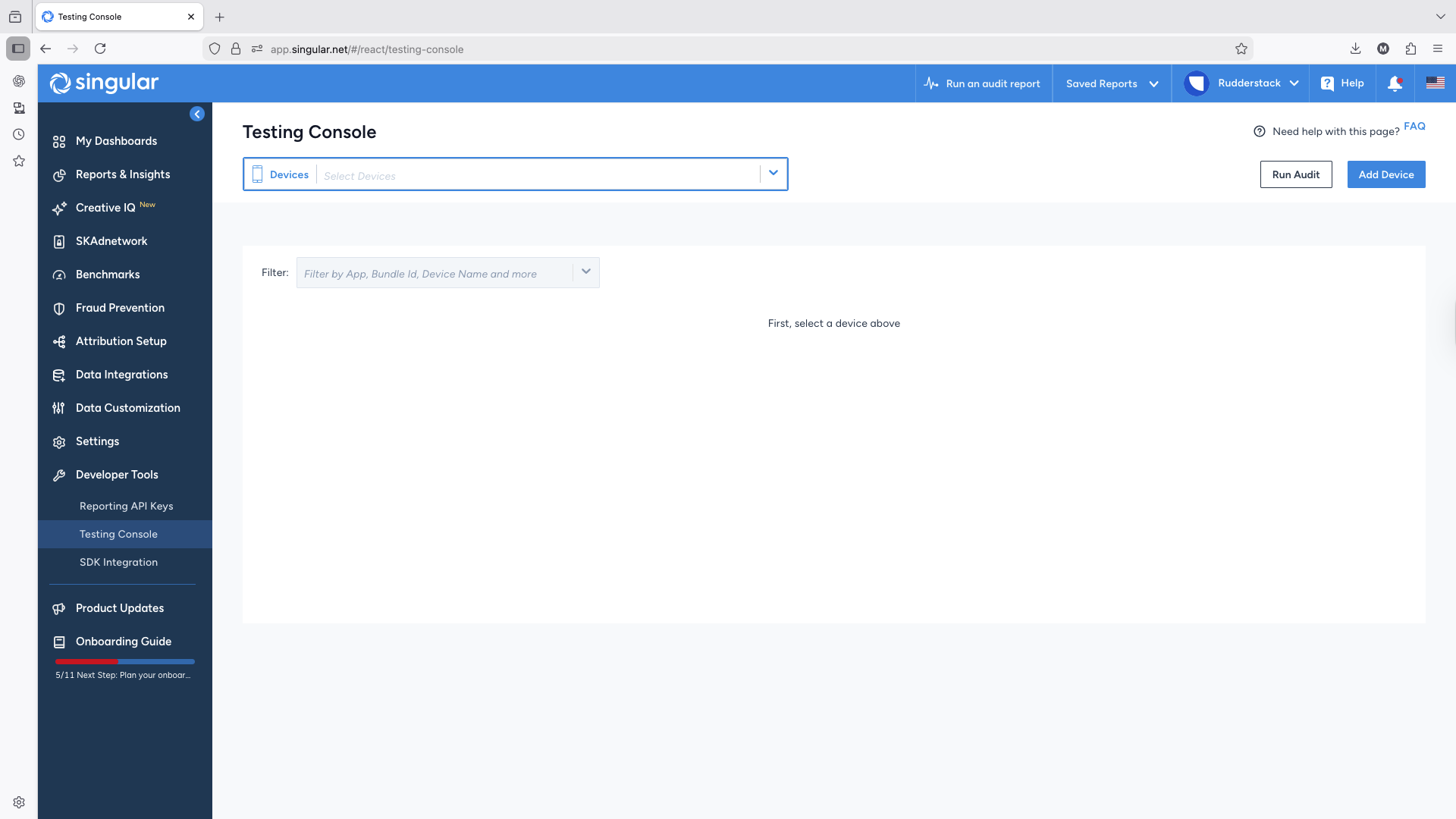
- To add a new device to track, click the Add Device option and choose the relevant settings:
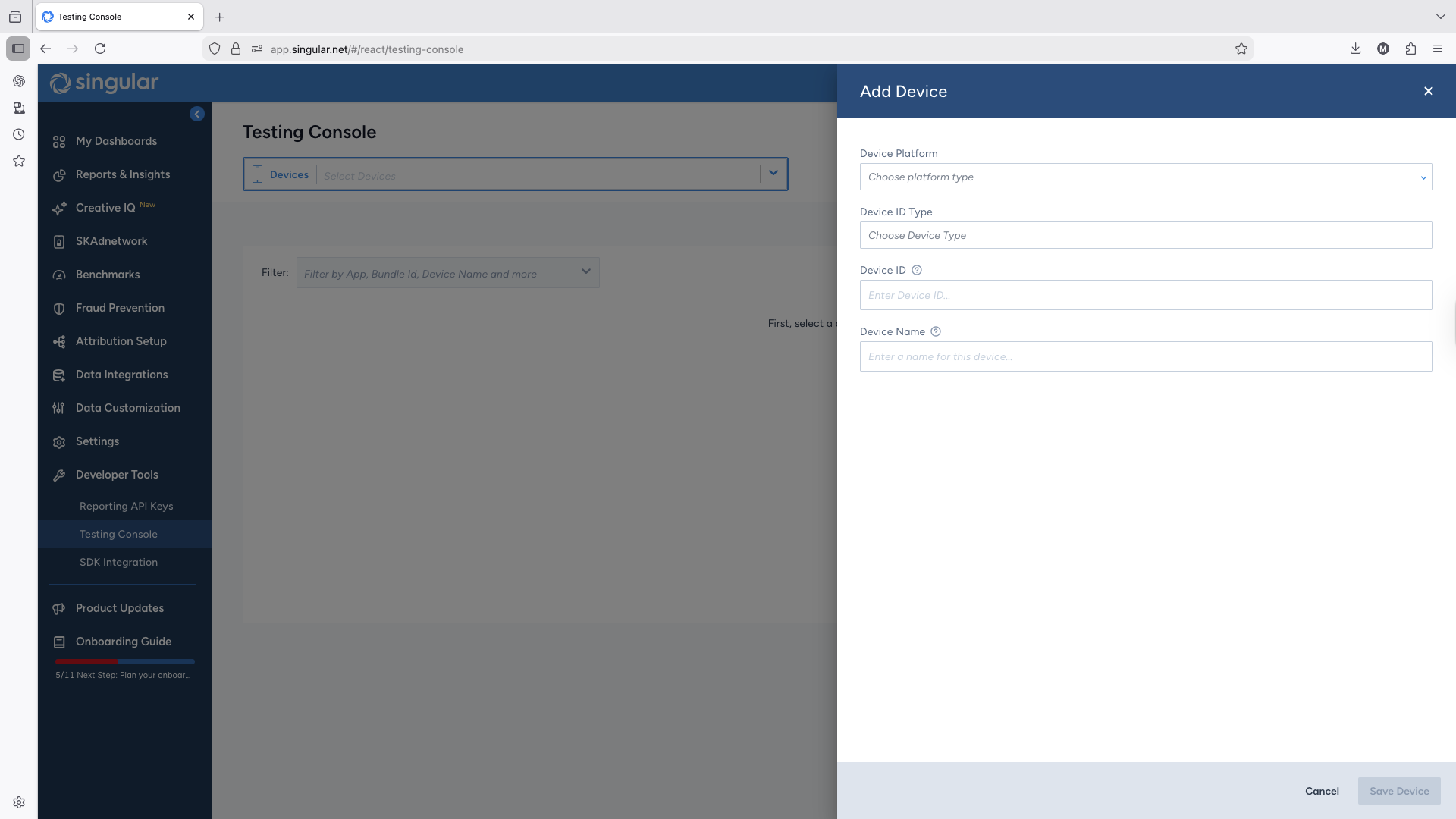
- You should see a list of tracked devices, as seen below:
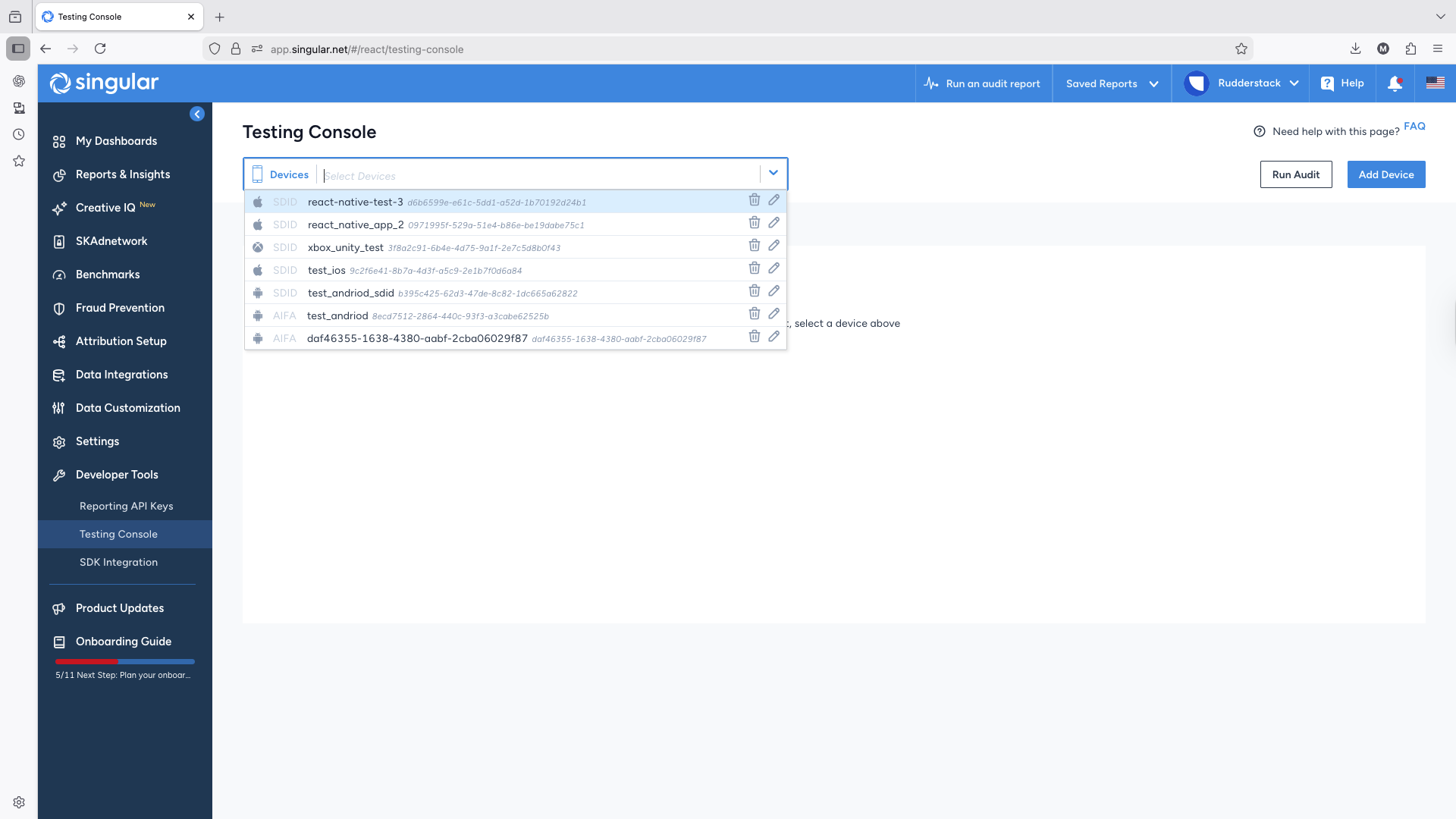
- Select the tracked device from the list to see the events in real-time.
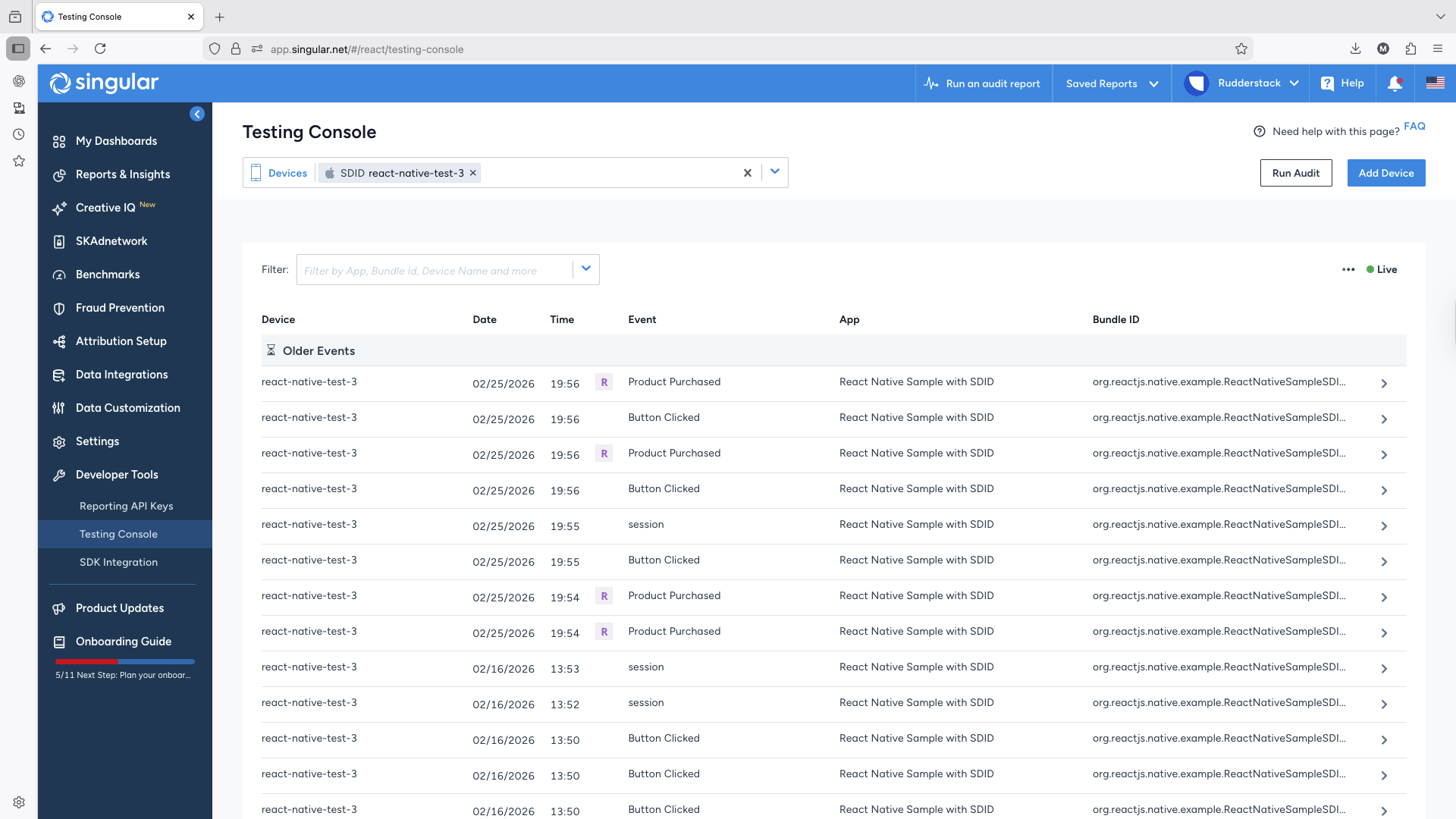
See the Singular documentation for more information on using the console for testing and validating your Singular integration.
Which device ID attributes are required for Android?
For Android requests, Singular requires either of the following attributes in the mentioned order of preference:
aifaasidandi
If none of them are available, you must send at least one with the empty value (instead of null or undefined). If you send all of them, RudderStack discards the andi attribute as per Google’s data policies.
